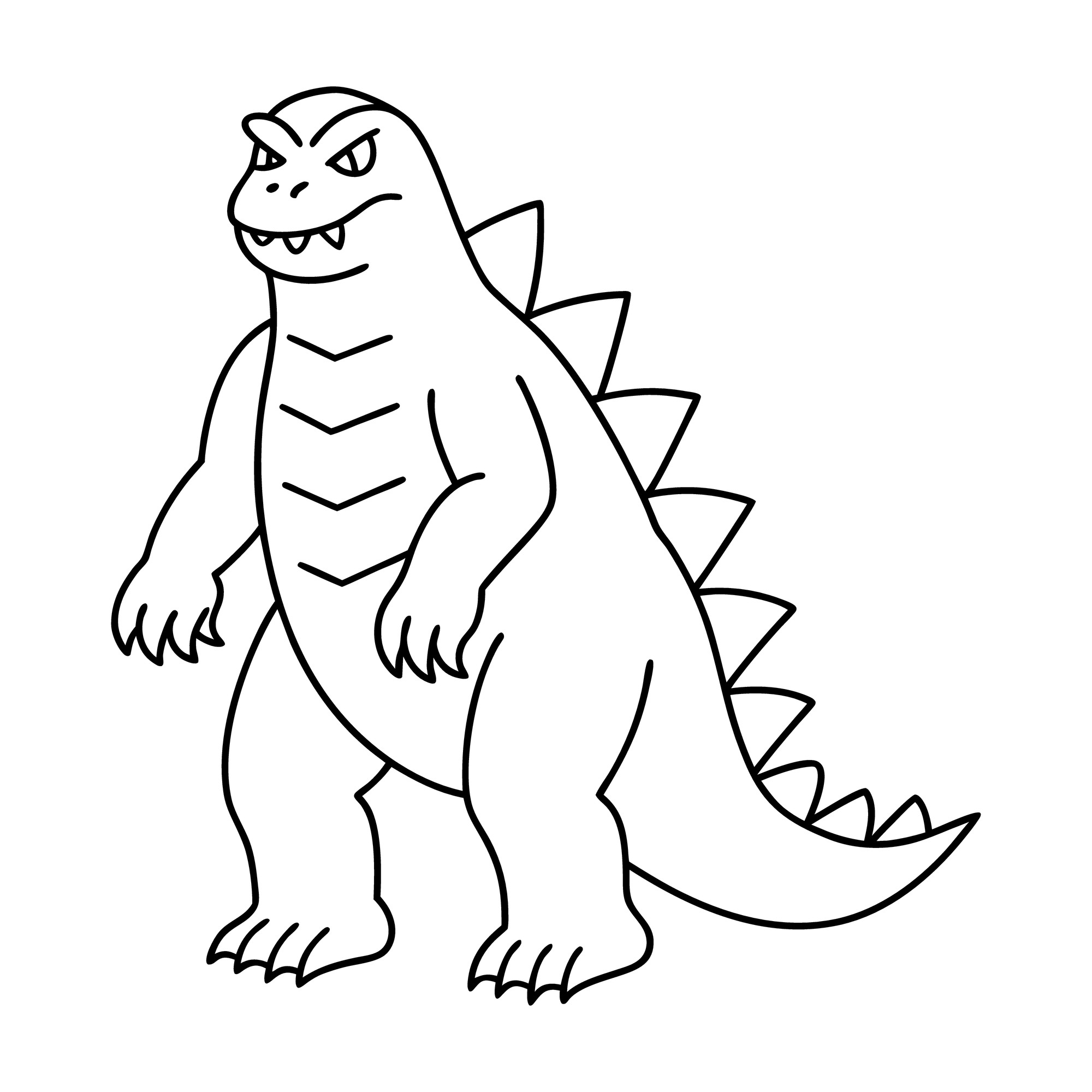
Get ready for a monster-sized coloring adventure with this Godzilla coloring page, featuring the legendary giant monster standing tall with powerful legs, an enormous tail, rough reptile-like skin, and the dramatic dorsal plates running down his back.
Godzilla has been a movie icon since his first appearance in Japan in 1954. Over more than seven decades, his appearance has changed many times, giving colorists plenty of freedom when choosing a palette. You can create a dark charcoal monster inspired by classic movie imagery, experiment with deep greens and blue-grays, make the dorsal plates glow with atomic energy, or invent a completely new rainbow version.
Because this printable focuses on Godzilla himself, there is also lots of room to expand the picture. Add a city skyline, storm clouds, ocean waves, mountains, another giant monster, or a dramatic burst of atomic breath. Younger kids can simply enjoy coloring the large monster, while older children can experiment with scale texture, shading, lighting, and their own monster-movie backgrounds.
Grab your crayons, markers, or colored pencils and prepare for a kaiju-sized art project.
🖍️ Shop Godzilla Coloring Books
🦖 Explore Our Godzilla Coloring Page
This printable features Godzilla standing upright in a classic giant-monster pose.
His powerful body fills most of the page, making him the clear focus. Along his back are the large jagged dorsal plates that have become one of Godzilla’s most recognizable features.
The design leaves plenty of opportunities to experiment with:
- Rough skin texture
- Shading
- Dorsal-plate colors
- Claws
- Tail details
- Monster eyes
- Background scenery
You can keep the picture simple or transform it into a complete movie-style scene.
For even more famous and imaginative figures, browse our Character Coloring Pages.
⚫ Color a Classic Dark Godzilla
Godzilla has appeared in many different designs over the decades, and his color has varied depending on the film, artwork, lighting, and version of the character.
For a dramatic classic-inspired palette, try:
- Charcoal gray
- Slate
- Dark gray
- Black
- Blue-gray
Begin with medium gray and gradually layer darker shades around the legs, tail, underside, and folds of the skin.
Leave a few sections lighter so Godzilla does not become one solid block of black.
Colored pencils are especially useful for this because you can build several shades gradually.
💚 Create a Deep Green Godzilla
Green is another popular color choice for monster artwork.
Try combining:
- Forest green
- Olive
- Moss green
- Dark teal
- Black-green
Keep the underside slightly lighter.
Add darker shading between the scales and around the legs.
For extra contrast, make the dorsal plates pale gray, icy blue, or electric turquoise.
A dark green monster against a glowing orange sunset can look especially dramatic.
🔵 Try a Blue-Gray Monster Palette
For a cooler interpretation, use:
- Slate blue
- Blue-gray
- Steel blue
- Navy
- Pale gray
Blend the shades together rather than outlining every section.
Then add pale blue or almost-white highlights across the dorsal plates.
This palette works particularly well if you decide to draw atomic energy around Godzilla.
🌈 Create a Rainbow Godzilla
A coloring page does not have to follow any movie.
Turn Godzilla into the most colorful kaiju ever imagined.
Try:
Head: Red
Body: Orange
Arms: Yellow
Legs: Green
Tail: Blue and purple
Then make every dorsal plate a different color.
You could even give Godzilla rainbow stripes, spots, or geometric patterns.
Perhaps this version is called:
Rainbowzilla
Prism Godzilla
or
The Technicolor Titan
Invent a story explaining why his colors changed.
🟣 Create a Purple Night Godzilla
For a fantasy version, try deep purple across the body.
Add:
- Indigo shadows
- Navy legs
- Lavender highlights
- Silver dorsal plates
Then draw a nighttime city behind him.
Color the sky black-blue and add glowing yellow windows.
A giant purple monster walking through a moonlit city can look surprisingly dramatic.
🔥 Design a Fire Godzilla
Imagine Godzilla powered by fire instead of atomic energy.
Use:
- Black
- Dark red
- Crimson
- Orange
- Golden yellow
Keep most of the body dark.
Then add glowing red cracks across the skin.
The dorsal plates can move from deep red near the body to bright yellow at their tips.
Draw flames or smoke in the background.
Your finished monster might look as though it has just emerged from a volcano.
❄️ Create an Ice Godzilla
Now do the opposite.
Make an icy monster using:
- White
- Pale blue
- Turquoise
- Silver
- Deep blue
Color the dorsal plates like enormous crystals.
Add snow, frozen buildings, or icy mountains around him.
Perhaps this version lives beneath a glacier instead of beneath the ocean.
Give your imaginary creature a new name such as:
Ice Godzilla
or
Frostzilla.
⚡ Make Godzilla’s Dorsal Plates Glow
The large plates running down Godzilla’s back are one of the best parts of the picture for experimenting with bright colors.
Try a glowing gradient:
White → Pale blue → Turquoise → Electric blue
Keep the center of each plate very light.
Use increasingly darker blue toward the edges.
Then draw a soft blue glow around the outside.
For another version, try:
Yellow → Orange → Red
or
Lavender → Purple → Pink
There is no rule saying atomic monster energy always has to be blue.
☢️ Add Godzilla’s Atomic Breath
One of Godzilla’s most famous abilities is his powerful atomic breath.
The printable does not need to show it already—you can draw your own.
Add a beam coming from Godzilla’s mouth.
Make it:
- Electric blue
- Turquoise
- White-blue
- Purple
- Fiery orange
- Rainbow-colored
Use long lines following the direction of the blast.
Add glowing light around Godzilla’s mouth and dorsal plates to make it seem as though energy is traveling through his body.
🌟 Create an Atomic-Energy Effect
To make the glow stronger, keep some areas nearly white.
Then surround them with gradually darker colors.
For a blue glow:
White → Pale blue → Turquoise → Royal blue
For purple:
White → Lavender → Violet → Deep purple
For fire:
White → Yellow → Orange → Red
The lighter center creates the impression of intense energy.
🪨 Color Godzilla’s Rough Skin
Godzilla’s skin is often depicted as rough, uneven, and heavily textured.
Instead of filling his body with one solid color, use short irregular strokes.
Try:
Base: Medium charcoal
Shadows: Black-gray
Highlights: Slate
Add little patches of lighter and darker color throughout the body.
Do not make the texture perfectly even.
Irregular variation can make the monster look older, rougher, and more dramatic.
🦶 Add Shading Around the Legs and Feet
Godzilla’s enormous legs help communicate his sense of scale.
Use darker shading:
- Beneath the body
- Behind the knees
- Along the inner legs
- Under the feet
- Beneath the tail
Keep the front of the legs slightly lighter.
Then draw a shadow on the ground beneath him.
A strong ground shadow can make Godzilla feel as though he actually has weight.
🐾 Create Giant Monster Footprints
Draw enormous footprints leading across the background.
Make each print almost as large as a car.
Add:
- Cracks
- Dust
- Rocks
- Broken pavement
Then imagine how a human footprint would compare.
Draw a tiny shoe print beside one Godzilla footprint.
The huge difference helps emphasize that this is no ordinary creature.
🏙️ Build a City Behind Godzilla
One of the easiest ways to transform the page is to draw a city skyline behind him.
Add:
- Skyscrapers
- Apartment buildings
- Bridges
- Streetlights
- Roads
- Towers
Keep the buildings smaller than Godzilla.
That difference in scale is what makes a giant-monster scene feel enormous.
You do not need complicated architecture.
Simple rectangles with rows of windows can create an entire city.
🌃 Create a Nighttime Monster Movie Scene
Color the sky:
- Navy
- Indigo
- Black
- Deep purple
Then fill the building windows with:
- Yellow
- Orange
- Pale blue
- White
Keep Godzilla dark against the brighter city lights.
Add a full moon or storm clouds behind him.
Tiny searchlights pointing toward the monster can make the picture feel even more cinematic.
🌅 Create a Sunset Godzilla
A giant monster silhouetted against a sunset can look spectacular.
Blend:
Yellow → Orange → Coral → Red → Purple
across the sky.
Keep the city dark at the bottom.
Godzilla can be charcoal or black with only a few orange highlights along the edges.
The warm sky will make his silhouette stand out.
🌩️ Add a Monster-Movie Thunderstorm
Dark weather can make Godzilla feel even more enormous.
Draw:
- Storm clouds
- Lightning
- Rain
- Wind
- Rough ocean waves
Use charcoal, blue-gray, navy, and purple.
Add white or yellow lightning bolts.
Maybe Godzilla is emerging from the ocean during the storm.
🌊 Godzilla Emerging From the Ocean
Godzilla is famously associated with the sea, so turn the bottom half of the page into an ocean scene.
Draw waves around his legs.
Use:
- Aqua
- Turquoise
- Royal blue
- Navy
- White foam
Make the water closest to Godzilla especially turbulent.
Add boats far away to show just how huge the monster is.
For even more water-inspired printables, explore our Ocean Coloring Pages.
🚢 Add Tiny Ships for Scale
Draw several tiny ships in the water.
They do not need much detail.
A simple boat shape with a smokestack is enough.
Place one close to Godzilla’s foot.
The smaller the ship appears, the larger Godzilla seems.
You can use the same trick with buildings, cars, helicopters, or people.
📏 How Do Artists Make Monsters Look Huge?
Artists and filmmakers often communicate size by showing familiar objects next to something enormous.
A giant creature by itself has no obvious scale.
But place it beside:
- Car
- House
- Ship
- Skyscraper
- Bridge
and suddenly the viewer understands how big it is supposed to be.
Try drawing three objects beside Godzilla:
Small: Car
Medium: House
Large: Skyscraper
Godzilla should tower over all of them.
🎬 Meet Godzilla
Godzilla first appeared in the Japanese film Godzilla, released by Toho in 1954.
The movie was directed by Ishiro Honda, with special-effects work led by Eiji Tsuburaya.
The original film introduced a giant creature connected with the fears of the atomic age. It was not simply a story about a monster knocking over buildings; its destructive power was closely tied to serious concerns about nuclear weapons and radiation in postwar Japan.
Godzilla went on to become one of the world’s most recognizable movie monsters, appearing in films and other media for more than seven decades.
🇯🇵 Godzilla Comes From Japan
Godzilla originated in Japanese cinema.
The original Japanese name is Gojira.
The character became enormously popular and eventually developed an international audience, but Godzilla’s roots remain deeply connected with Japanese filmmaking and Toho Studios.
Turn that into a geography activity.
Find Japan on a world map.
Then find the Pacific Ocean.
Older children can locate Tokyo as well.
For more geography-friendly activities, explore our Educational Coloring Pages & Activities.
🗾 Find Japan on a Map
Japan is an island country in East Asia.
Find it on a globe or map.
Then locate:
- Pacific Ocean
- Asia
- Tokyo
Draw a little monster symbol beside Japan.
You can also trace an imaginary route across the Pacific showing how a Japanese movie character eventually became famous around the world.
👹 What Does Kaiju Mean?
Godzilla is commonly described as a kaiju, a Japanese term used for monsters or strange beasts.
In popular movie discussions, kaiju is especially associated with enormous creatures that appear in Japanese monster films.
Godzilla became one of the defining figures of the genre.
Other kaiju stories can feature flying monsters, giant insects, enormous reptiles, mechanical creatures, aliens, and completely imaginary beings.
Invent your own kaiju after finishing Godzilla.
✏️ Design Your Own Kaiju
Draw a giant monster no movie has ever seen.
Choose:
Body: Reptile, insect, bird, robot, or something new
Number of legs: Two, four, six, eight?
Special ability: Fire, ice, electricity, wind, sound?
Habitat: Ocean, volcano, space, forest, city?
Size: Building-sized or mountain-sized?
Then give the monster a name.
Maybe you create:
Stormagon
Crystallax
Volcanor
Moonfang
or
Thunderclaw
🐉 Godzilla vs. Dragon
Godzilla and dragons share some visual features, but they come from different kinds of stories.
Godzilla is a modern fictional movie monster.
Dragons come from much older legends and folklore found in cultures around the world.
Both can be depicted with:
- Scales
- Claws
- Powerful tails
- Enormous size
- Destructive abilities
But dragons may have wings, horns, or magical powers that Godzilla usually does not.
Color Godzilla and then explore our Coloring Pages of Dragons.
Which creature would you rather design?
🦖 Is Godzilla a Dinosaur?
Godzilla looks somewhat dinosaur-like, but he is not a real dinosaur species.
He is a fictional monster whose origins and exact nature have changed across different movies and continuities.
The original film presents him as a prehistoric creature transformed by atomic testing, but paleontologists have never discovered an animal called Godzilla that looked exactly like the movie monster.
That makes Godzilla different from a Tyrannosaurus, Triceratops, Stegosaurus, or Velociraptor.
Those animals actually lived millions of years ago.
Godzilla lives in movies and imagination.
🦕 Godzilla vs. Real Dinosaurs
Compare Godzilla with the prehistoric animals in our Coloring Pages of Dinosaurs.
Ask:
Which has the larger dorsal structures?
Which walks on two legs?
Which has a long tail?
Which is real?
Which is fictional?
Then design a creature that combines features from several dinosaurs.
Maybe your monster has:
- Tyrannosaurus head
- Stegosaurus plates
- Ankylosaurus tail
- Triceratops horns
Now give it Godzilla-sized proportions.
🦖 Godzilla and Tyrannosaurus
Both Godzilla and Tyrannosaurus are often imagined as enormous upright reptile-like creatures, but the similarities should not be taken too far.
Tyrannosaurus rex was a real theropod dinosaur with a body structure understood from fossil remains.
Godzilla’s anatomy was designed for a fictional movie monster and has changed considerably over the years.
Color a T. rex and Godzilla side by side.
Then circle which one belongs in:
Paleontology
and which belongs in:
Movie history.
🦕 Godzilla and Stegosaurus Plates
Godzilla’s dramatic dorsal plates may remind children of the plates on dinosaurs such as Stegosaurus.
But the structures are not identical.
Stegosaurus was a real Jurassic dinosaur with rows of bony plates along its back.
Godzilla’s plates are fictional features that vary from one screen design to another and often become visually connected with his atomic energy.
Draw both silhouettes and compare the shapes.
🐊 Godzilla vs. Modern Reptiles
Godzilla also has features that may remind viewers of modern reptiles.
His rough skin, tail, claws, and heavy body can suggest crocodiles or large lizards.
But again, Godzilla is not an actual reptile species.
Try looking at a picture of a crocodile or lizard and compare:
- Skin
- Legs
- Tail
- Head
- Teeth
Then decide which features you would borrow when designing your own giant monster.
🦈 Godzilla vs. Shark
Godzilla and sharks both appear naturally in monster-movie imagination, but one is fictional and the other represents a real group of animals.
Sharks are fish with cartilage-based skeletons, gills, fins, and bodies adapted to aquatic life.
Godzilla is a fictional giant creature whose abilities extend far beyond anything in nature.
Color a real shark after your monster adventure with our Shark Coloring Pages.
🎥 How Was the Original Godzilla Filmed?
The 1954 movie was made long before modern computer-generated movie monsters.
Filmmakers relied heavily on practical special effects.
Godzilla was famously portrayed using performers in monster suits, including actor Haruo Nakajima, alongside puppetry and other effects techniques.
Miniature buildings and landscapes helped make the monster appear enormous.
Special-effects director Eiji Tsuburaya and his team combined these techniques to create a convincing world where a gigantic creature could tower over a city.
🏢 Build a Miniature Monster City
You can recreate the idea behind practical monster effects using simple art materials.
Draw or build tiny:
- Buildings
- Trees
- Cars
- Bridges
Then place a large paper Godzilla nearby.
Because everything around him is small, Godzilla suddenly looks enormous.
Photograph the scene from a low angle if an adult is helping.
Changing the camera angle can make the paper monster look even bigger.
🎭 Become a Movie Monster Performer
The early Godzilla movies famously used suit performers to help bring the monster to life.
Try pretending you are a giant movie monster.
Move slowly and heavily.
Imagine every step is enormous.
Stretch your arms.
Turn gradually.
Swing an imaginary tail.
Then freeze in a dramatic Godzilla pose.
This can be a fun movement break after sitting and coloring.
🎬 Make a Paper Monster Movie
Color Godzilla and carefully cut out the character with age-appropriate supervision.
Create paper scenery:
- City
- Ocean
- Mountains
- Moon
- Volcano
Move the cutout through the scene.
Someone can narrate what happens.
Maybe Godzilla arrives to destroy the city.
Maybe this time he saves it from another giant monster.
Your coloring page has become a homemade movie prop.
🎞️ Create a Godzilla Movie Poster
Turn the finished page into your own monster-movie poster.
Add a dramatic title:
GODZILLA RETURNS
ATTACK OF THE GIANT MONSTER
GODZILLA: CITY OF THUNDER
or invent your own.
Draw:
- Lightning
- Flames
- Skyline
- Moon
- Ocean waves
Then add a pretend release date at the bottom.
Try large block letters to make the title feel enormous.
🖍️ Design a Monster-Movie Logo
Write:
GODZILLA
in huge letters.
Fill each letter with:
- Scales
- Flames
- Cracks
- Atomic glow
- City lights
Or design the title of your own kaiju movie.
Experiment with jagged letters that look like claws have ripped through them.
🌋 Godzilla at a Volcano
A volcanic background fits perfectly with a giant monster.
Draw:
- Mountain
- Lava
- Smoke
- Ash clouds
- Glowing rocks
Use:
Lava: Yellow, orange, red
Rock: Gray, black, brown
Smoke: Charcoal and gray
Keep Godzilla darker than the glowing lava.
Orange light along one side of his body can make it seem as though the eruption is illuminating him.
🗻 Godzilla in the Mountains
For a quieter monster scene, place Godzilla among huge mountains.
Use blue-gray on distant peaks and stronger browns or greens closer to the foreground.
Add forests at the base.
Tiny trees will make Godzilla look even larger.
Maybe the monster has wandered far from the city and is simply moving through the wilderness.
🌌 Godzilla in Space
Godzilla does not have to remain on Earth in your imagination.
Create a space version.
Use:
- Black
- Navy
- Purple
- Silver
Draw planets and stars around him.
Turn the dorsal plates into glowing cosmic crystals.
Maybe Godzilla has landed on an alien planet where the buildings are even larger than he is.
🌕 Godzilla Under a Full Moon
A full moon can create a particularly dramatic monster picture.
Draw a huge circle behind Godzilla.
Color it pale yellow, cream, or silver.
Keep the monster mostly dark.
The bright moon will create a silhouette effect.
Add clouds partially covering the moon and a few bats or birds in the distance.
🏙️ Godzilla: Destroyer or Defender?
Godzilla’s role has changed greatly across different movies.
Sometimes he appears as a terrifying destructive force.
In other stories, he battles other monsters and can function more like a defender.
That makes a good storytelling choice.
What role does your Godzilla play?
Destroyer
He has arrived to wreck the city.
Defender
Another monster threatens the city, and Godzilla arrives to stop it.
Choose one and draw the rest of the scene.
🐲 Invent Godzilla’s Next Opponent
Every giant monster needs a worthy rival.
Design one.
Perhaps it is:
- Three-headed dragon
- Giant insect
- Robot
- Sea monster
- Flying reptile
- Giant plant
- Alien creature
Decide which colors will contrast with Godzilla.
If Godzilla is dark gray, try making the opponent bright gold or red.
If Godzilla is green, make the rival purple or blue.
Then draw the two monsters facing each other.
🤖 Create a Robot Monster
Design a mechanical opponent.
Use:
- Silver
- Steel gray
- Black
- Red lights
- Blue lights
Add:
- Metal claws
- Rocket boosters
- Armor
- Antennas
- Glowing eyes
Give it a mechanical name such as:
Mega-Bot
Steel Titan
or
Robo-Kaiju X.
Then decide whether it was built to fight Godzilla or accidentally became his friend.
🐛 Create a Giant Insect Monster
Ordinary insects become very different when imagined at skyscraper size.
Start with:
- Beetle
- Moth
- Wasp
- Praying mantis
Then make it enormous.
Add giant wings and huge legs.
Use bright insect-inspired colors such as emerald, gold, red, purple, and black.
Perhaps the wings are covered with glowing patterns.
🌊 Create a Sea Monster
Godzilla emerging from the water could encounter an entirely new ocean kaiju.
Design something inspired by:
- Octopus
- Shark
- Whale
- Crab
- Jellyfish
Maybe it has eight tentacles and shark teeth.
Perhaps it glows like a jellyfish.
Add huge waves around both monsters.
🏗️ Build Your Own Kaiju City
Draw an entire city specifically designed for giant monsters.
Maybe the skyscrapers are extra strong.
Add:
- Monster warning lights
- Giant bridges
- Underground shelters
- Observation towers
- Huge harbor
Perhaps everyone living there expects kaiju visits.
What features would a city need if enormous monsters regularly walked through it?
🚁 Add Tiny Helicopters
Small helicopters are another easy way to show scale.
Draw several near Godzilla’s shoulders.
Color them:
- Gray
- Black
- Red
- Yellow
Add tiny spinning rotor lines.
A helicopter should look very small compared with Godzilla’s head.
That size contrast instantly makes the monster seem enormous.
🚗 Add Cars and Roads
Draw a street beneath Godzilla.
Add several tiny cars.
Try:
- Red
- Blue
- Yellow
- Green
Keep the vehicles much smaller than his feet.
Draw lane markings and traffic lights.
The everyday objects make the monster’s size easier to understand.
🔢 Monster-Sized Counting
Turn the page into a counting activity.
Add:
2 helicopters
3 buildings
4 cars
5 clouds
Then count everything.
Older children can write simple equations:
2 helicopters + 3 helicopters = 5 helicopters
Monster art and early math can exist on the same page.
🔤 G Is for Godzilla
For younger children, practice:
G g
Then say:
G is for Godzilla.
Think of more G words:
- Green
- Giant
- Gold
- Garden
- Goat
- Giraffe
Draw a giant letter G beside Godzilla.
Fill it with scale patterns.
For a complete alphabet collection, explore our Coloring Pages of Letters.
🔤 M Is for Monster
Try:
M m
M is for monster.
Other M words include:
- Moon
- Mountain
- Map
- Mouse
- Mushroom
Create a scene containing as many M words as possible.
Perhaps the monster stands beneath the moon beside a mountain.
📏 Giant, Bigger, Biggest
Godzilla is perfect for practicing size words.
Draw:
Small monster
Medium monster
Giant monster
Then arrange them from smallest to largest.
Use words such as:
- Smaller
- Bigger
- Taller
- Shorter
- Largest
- Smallest
Children can even measure their drawings with a ruler.
🔺 Find Shapes in the City
Monster-city scenes contain plenty of basic shapes.
Look for:
Rectangles: Buildings
Squares: Windows
Circles: Moon and wheels
Triangles: Rooftops or dorsal plates
Draw each shape around Godzilla.
Then use basic shapes to build another skyscraper.
🧩 Godzilla Scavenger Hunt
After finishing the picture, see if children can point to:
- Tail
- Claws
- Dorsal plates
- Teeth
- Eye
- Foot
- Arm
- Head
Then add background items and search for:
- Building
- Car
- Moon
- Cloud
- Wave
The page becomes a simple observation activity.
🏫 Godzilla Coloring Page for the Classroom
A Godzilla coloring page can work surprisingly well alongside topics such as movies, Japanese popular culture, storytelling, visual scale, fictional versus real animals, and special effects.
Teachers and homeschool families can use it for:
- Character-themed coloring
- Creative writing
- Movie history
- Japan geography
- Fiction vs. nonfiction
- Dinosaur comparisons
- Size and scale
- Letter G practice
- Counting
- Art and design
- Story sequencing
- Early-finisher activities
For more learning-oriented printables, explore our Educational Coloring Pages & Activities.
🎒 Fiction vs. Reality Activity
Create two columns.
REAL
- Dinosaurs
- Crocodiles
- Lizards
- Sharks
- Japan
- Pacific Ocean
FICTIONAL
- Godzilla
- Atomic breath
- Skyscraper-sized movie monsters
Then let children suggest more examples.
It is a simple way to separate elements inspired by the real world from things created for stories.
📖 Turn Godzilla Into a Story Prompt
The printable leaves plenty unanswered.
Why has Godzilla appeared?
Where is he going?
Is there a city nearby?
Has another monster arrived?
Is he angry—or protecting something?
What happens next?
Children can tell the story aloud or write several sentences.
The same picture could inspire completely different stories from different colorists.
✏️ Write a New Godzilla Adventure
Start with:
The ocean suddenly became completely still. Then something enormous rose above the waves…
Continue the story.
Maybe Godzilla arrives at an empty island.
Perhaps he discovers another giant creature.
Maybe the city expects destruction, but Godzilla has actually come to warn everyone about something even larger.
Use the finished coloring page as your story illustration.
📕 Make a Monster Storybook
Combine Godzilla with other fantasy and prehistoric coloring pages.
Add:
Arrange the finished pages into an adventure.
Maybe a dragon appears first.
Then a dinosaur is discovered.
Finally, Godzilla rises from the ocean.
Create a cover titled:
The Giant Monster Adventure
🎭 Make a Godzilla Puppet
Color the page and carefully cut out Godzilla with age-appropriate supervision.
Attach the cutout to:
- Craft stick
- Cardboard strip
- Paper handle
Then create another monster puppet.
Make the two characters act out a story.
A shoebox can become a miniature city stage.
🏙️ Make a Paper City Collage
Cut rectangles from construction paper.
Turn them into buildings by adding small square windows.
Glue them across a large piece of paper.
Then place the finished Godzilla picture behind the skyline.
Add cotton clouds, a paper moon, and colored-paper roads.
The coloring sheet becomes part of a much larger mixed-media artwork.
🪨 Add Texture to Godzilla
If you want to turn the coloring page into a craft, add texture after coloring.
Try small pieces of:
- Crumpled tissue paper
- Textured paper
- Cardstock
Use them sparingly across the dorsal plates or background rocks.
The goal is to add dimension without covering the original drawing completely.
🎨 Godzilla Coloring for Older Kids
Older children can experiment with more advanced art ideas.
Try:
- Light source
- Cast shadows
- Color gradients
- Texture
- Atmospheric perspective
- Glowing effects
- City perspective
For example, if atomic energy glows blue from Godzilla’s dorsal plates, nearby areas of his body can receive a faint blue highlight.
This creates the impression that the light belongs inside the scene.
💡 Choose a Light Source
Before coloring, decide where the strongest light comes from.
Maybe it is:
- Moon
- Sunset
- Fire
- Atomic energy
- City lights
Shade the side facing away from the light more heavily.
Keep the illuminated edge lighter.
This one decision can make a simple monster page feel much more dramatic.
🌫️ Use Distance to Make the Scene Look Deeper
Objects far away often appear lighter and less detailed.
Try making distant buildings pale gray-blue.
Keep nearby buildings darker and sharper.
Then place Godzilla between them.
This creates a sense of depth without requiring complicated perspective drawing.
🖍️ Best Supplies for This Godzilla Coloring Page
Crayons work well for younger children and broad areas.
Colored pencils are especially useful for rough skin texture, dark shading, and glowing dorsal plates.
Markers can create dramatic, saturated backgrounds such as dark blue skies or bright atomic energy.
If using markers, place scrap paper beneath the page in case the ink bleeds through.
You can also combine supplies.
Try pencil texture on Godzilla with marker color in the sky.
🖨️ How to Use Your Godzilla Coloring Page
Print the page and gather crayons, markers, colored pencils, or your other favorite art supplies.
Regular printer paper works well for everyday coloring. Heavier paper can be useful if you plan to use markers, paint, glue, or craft materials.
Then decide what kind of Godzilla adventure you want to create.
Maybe he is dark charcoal with icy blue dorsal plates.
Perhaps he is green beneath an orange sunset.
Maybe he rises from a stormy ocean, walks through a glowing city, battles your own invented kaiju, or becomes the first rainbow Godzilla in movie-monster history.
One printable can become countless different monster scenes.
🦖 Create Your Own King of the Monsters
With Godzilla standing tall and displaying his unmistakable giant-monster silhouette and dramatic dorsal plates, this printable provides plenty of space for both straightforward coloring and much bigger creative projects.
Experiment with charcoal, green, blue-gray, neon, fire, ice, or rainbow palettes. Make the dorsal plates glow, add atomic breath, build a miniature city, create an ocean entrance, design another kaiju, compare Godzilla with real dinosaurs, learn a little about Japanese monster movies, or transform the finished picture into your own movie poster.
Godzilla may have begun on Japanese movie screens in 1954, but what happens on this coloring page is entirely up to you.
Grab your colors and make some monster-sized art.
🖍️ Shop Godzilla Coloring Books
🔗 Related Articles
- Character Coloring Pages
- Coloring Pages of Dinosaurs
- Coloring Pages of Dragons
- Fantasy Coloring Pages
- Shark Coloring Pages
- Ninja Coloring Pages
- Wonder Woman Coloring Page
- Coloring Pages of Spiderman
- Educational Coloring Pages & Activities
- Coloring Pages for Kids
📚 Sources
- Godzilla Official — Godzilla: The First 70 Years
- Toho International — The Home of Godzilla
- British Film Institute — Gojira (1954)
- British Film Institute — Where to Begin With Kaiju Monster Movies
- British Film Institute — All-Out Puppet Attack! The Monster Puppetry in Ishiro Honda’s Kaiju Classics
🖍️Shop Godzilla Coloring Books –>